
How to stay organized as a nurse educator
Search this question and you'll get study-planner advice for nursing students. Not the job. You're one person carrying compliance, orientation, rounding, education requests, classes, and committee work for a hundred or more staff. Organization at that scale isn't a personality trait — it's a system. Here's one that holds, built from the actual workload.
Why educators feel disorganized (it's structural)
It's not you. The role sits across at least five disconnected surfaces: the LMS (assigned learning), the scheduling system, email and Teams, whatever the last educator left behind in Excel, and the hallway — where real requests actually arrive. None of these talk to each other, and none of them shows you a day. Disorganization is what it feels like when your workload has no single home.
Step 1 — Give the day one home
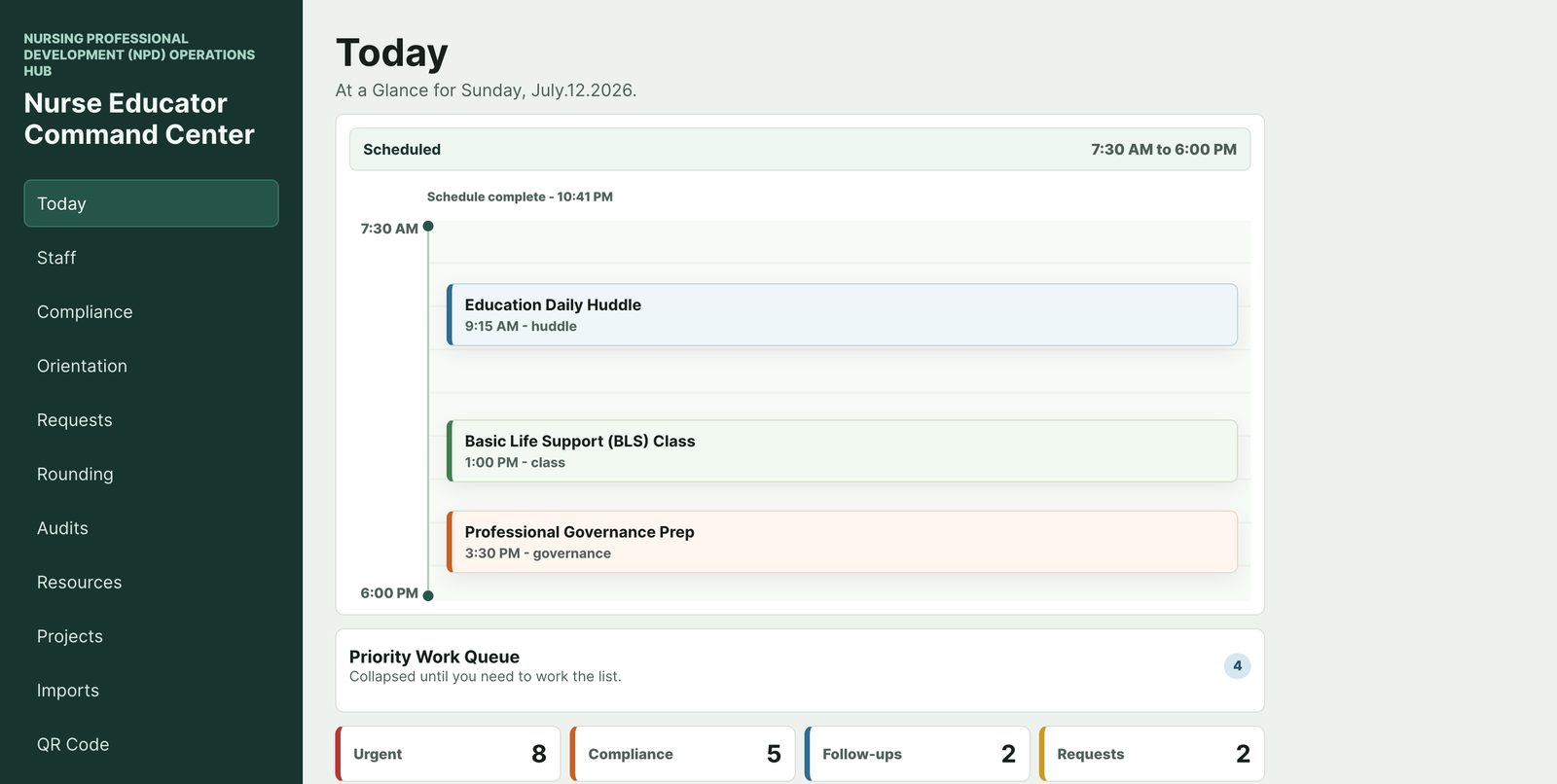
Every workable educator system starts the same way: one surface you check first, every shift, that answers three questions — what's scheduled today, what's urgent, and what needs action next. Calendar alone can't do it (it only knows meetings). Inbox can't do it (it only knows what other people want). Build a "today view": today's schedule on top, then your five to ten live priorities, then the counts you're accountable for — how many compliance items are inside 30 days, how many orientees are active, how many requests are open. On paper, that's a daily index card. In a spreadsheet, it's a dashboard tab. The medium matters less than the habit: same surface, every morning, before email.
Step 2 — Run four queues, not one list
A single to-do list dies under this job, because the work arrives on four different clocks:
- Compliance — date-driven. Items become urgent by the calendar (a BLS card expiring in 30 days), not by anyone asking.
- Orientation — phase-driven. Each orientee advances week by week; the question is always "on track or behind?"
- Requests — arrival-driven. Education asks show up at random and age quietly, so they need intake, a priority, and an owner.
- Rounding & recurring — cadence-driven. Weekly unit rounds, huddles, committee prep — work that isn't urgent until you've skipped it twice.
Keep them as four separate lists with different sort keys: compliance by due date, orientation by person, requests by age and priority, cadence by unit-week. The mistake that sinks most educators is forcing all four clocks into one inbox.
Step 3 — The weekly reset (30 minutes, non-negotiable)
Pick a low-interruption half hour — many educators use early Friday. Walk the four queues in order and ask one question each: Compliance — what enters the 30-day window next week? Orientation — who do I need to see or check in on, and which preceptor do I need to hear from? Requests — what's aging past a week without an owner? Cadence — which units haven't seen me? Out of that, write next week's top five. The reset is what turns your system from a record of the past into a plan.
Step 4 — A spreadsheet stack that doesn't collapse
If you're running Excel or Google Sheets (most educators are), a few rules keep it alive: one workbook per queue, not one giant workbook; one row per real-world thing (a person-requirement pair, an orientee, a request); a date column in every sheet, formatted as a date, because "next month" isn't sortable; and a conservative habit of archiving rows instead of deleting them. Resist merged cells and color-as-data — if a status matters, make it a column. For the compliance tracker specifically — the fields, risk ladder, and follow-up loop — see the dedicated guide: How to track staff education compliance.
Step 5 — Protect the system from the job
Two failure modes to design against. First, the hallway: never trust a verbal ask to memory — capture it in the requests queue within the hour, even as three words. Second, absence: write your today view and queues as if a colleague might have to read them cold during your PTO. If your system only works with you standing in it, it isn't a system yet.
Where an app fits
Everything above works on paper and spreadsheets — educators have run it that way for years. It's just heavy: five surfaces to maintain by hand, due-date math done in your head, and nothing following you down the hallway.
Nurse Educator Command Center was built as exactly this system, pre-assembled: a Today screen for step 1, the four queues as first-class modules (Compliance, Orientation, Requests, Rounding) for step 2, and everything on your phone for the hallway problem — with staff-linked records kept on your device.
FAQ
What's the single highest-leverage habit?
The daily today-view check before email. It converts your workload from ambient anxiety into a list, and it takes five minutes.
Paper, spreadsheet, or app?
Whichever you'll actually maintain. Paper wins on capture speed, spreadsheets win on sorting and counts, an app wins on carrying due-date logic and the hallway. Many educators run a hybrid: capture on paper, track in the queues.
How is this different from generic productivity advice?
Generic systems assume one list and self-driven deadlines. This role has four work clocks — calendar-driven compliance, phase-driven orientation, arrival-driven requests, cadence-driven rounds — and the system has to respect that or it collapses.